

Overview
When a charger misbehaves, the question worth answering first is which layer is broken. A charge box holds its own history at three levels of depth, and each one rules something in or out.
Work down the list, not up from the bottom. A charge box that was offline for the hour in question explains itself, and reading OCPP messages to discover that takes far longer than reading connectivity history.
All three open from the three-dot menu on any table that lists charge boxes or EVSEs: a location’s Charge boxes tab, the Connectors page, and Operations → Monitoring. Connectivity history and OCPP logs sit on the charge box; status history sits on the EVSE.
None of it ages out. All three records reach back to the charge box’s first connection and are kept from then on.
Connectivity history
The charge box’s connectivity history records when it connected to the platform and when it dropped. It also shows whether a drop is a one-off or a pattern. A charge box that has reconnected fifteen times this week is telling you something different from one that dropped once. The first is usually a network or power problem at the site; the second may be nothing at all.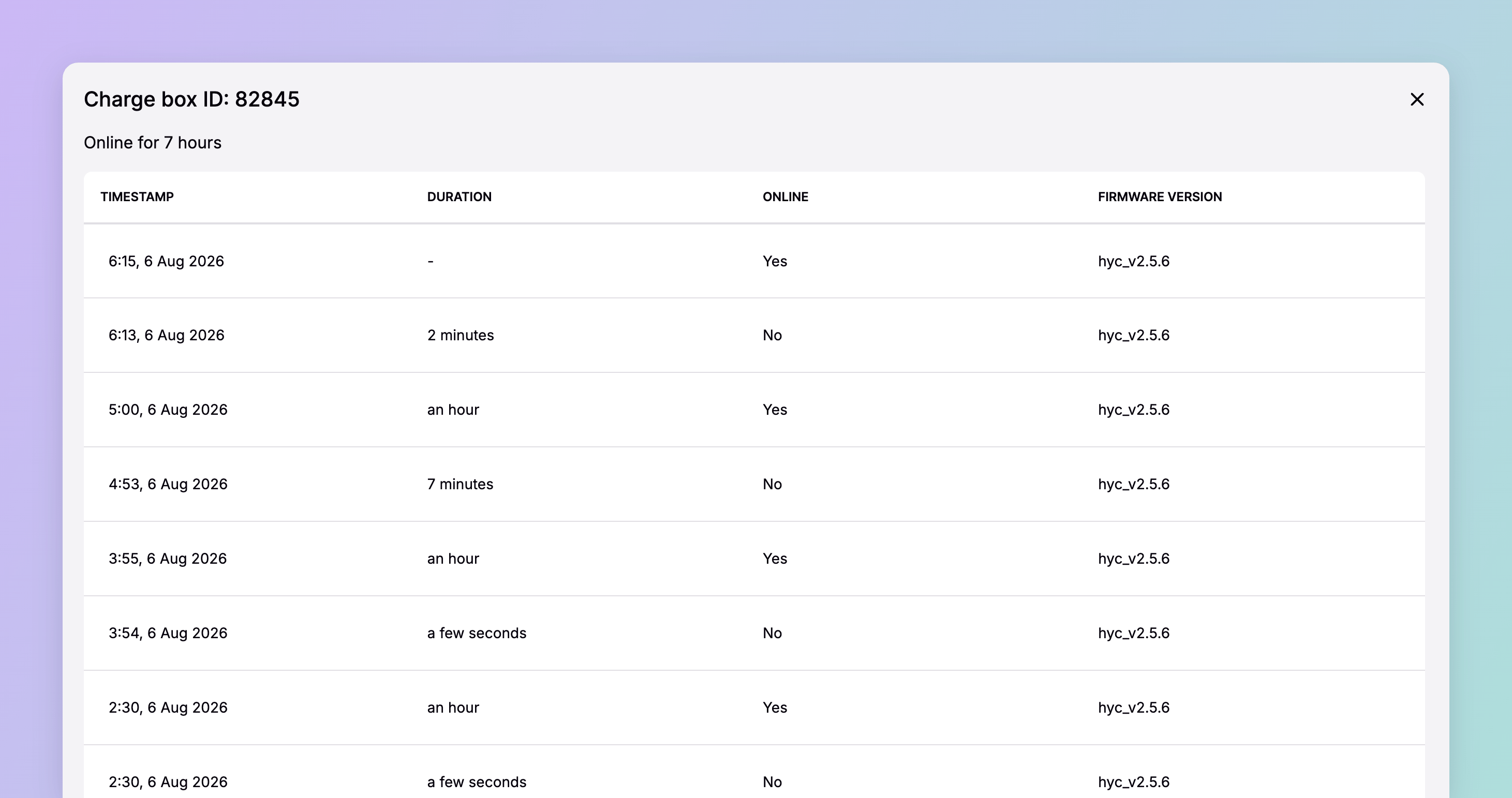
Status history
An EVSE’s status history records its charging status over time, and when each change happened. Where connectivity history tells you whether the charge box was talking, status history tells you what it was talking about. This is where you separate a fault from a driver’s experience of one. An EVSE that moved to Preparing and back to Available without charging did not fail in the way an EVSE that reported Faulted did, and the two need different conversations with the hardware manufacturer. Status history pages the same way, and has no date filter either.OCPP logs
OCPP logs are the full message-level record of a charge box’s conversation with the platform. Each entry carries the request and the response as JSON. You see precisely what was asked and what came back. Recent entries load with the page; anything older than the last couple of days is retrieved from storage. Use the timestamp filter to reach it, and expect the query to take longer than a page of recent traffic. Two filters narrow the list:- Timestamp — the window you care about, and the way to reach older records
- Message type — any of the OCPP 1.6 message types
A worked example
A driver reports that EVSEDE*SPI*E00012345 at Munich DC Hub would not start a session on the afternoon of Tuesday 22 Apr 2025.
1
Check connectivity history
The charge box held an unbroken connection across that window. It was reachable, which rules out the site’s network.
2
Check status history
The EVSE moved to Preparing at 14:11 and back to Available at 14:13, with no charging in between. The driver plugged in and the charger acknowledged it: the cable and the socket did their job.
3
Read the OCPP logs
Filtered to that two-minute window, they show the authorisation request the charge box sent and the response it received. That is the exchange that decided whether the session began.
Dependencies & limitations
- Connectivity and status history have no date filter. Reaching an older event means paging back through the list. Only the OCPP logs carry a timestamp filter.
- Older OCPP entries are slower to load. Anything beyond the last couple of days is fetched from storage, so narrow the timestamp window before you run the query.
- Message types follow OCPP 1.6. The filter’s options are the OCPP 1.6 message set.
- These three views are Connect-only. The Spirii API has no endpoint for connectivity history, status history, or OCPP logs, and none of them appear in Exports. Read them in Connect, or capture what you need from the screen.
Related
If you arrived here from an alert, start with connectivity history and work down.Faults & alerts
The Monitoring list these views hang off, and the alerts that point you at one.
Remote commands
Acting on what the history tells you.
Live status tracking
What every connector is doing right now, rather than what it did.
Roles and permissions
Which role each user needs, and what each one can do in Connect.