

Overview
Every EVSE has two statuses that normally agree. Its actual status is what the charger reports over OCPP, such as available or charging. Its displayed status is what drivers see in eMSP apps. A temporary EVSE status lets you set the displayed status on its own, for a period you choose, without changing what the charger is really doing. This solves something the standard OCPP controls can’t. Setting an EVSE unavailable over OCPP (the change availability command) takes it genuinely offline, which locks out the technician who needs to test it. A temporary status changes only what drivers see: the app reports the unit as out of service while the charger stays fully operational for on-site work.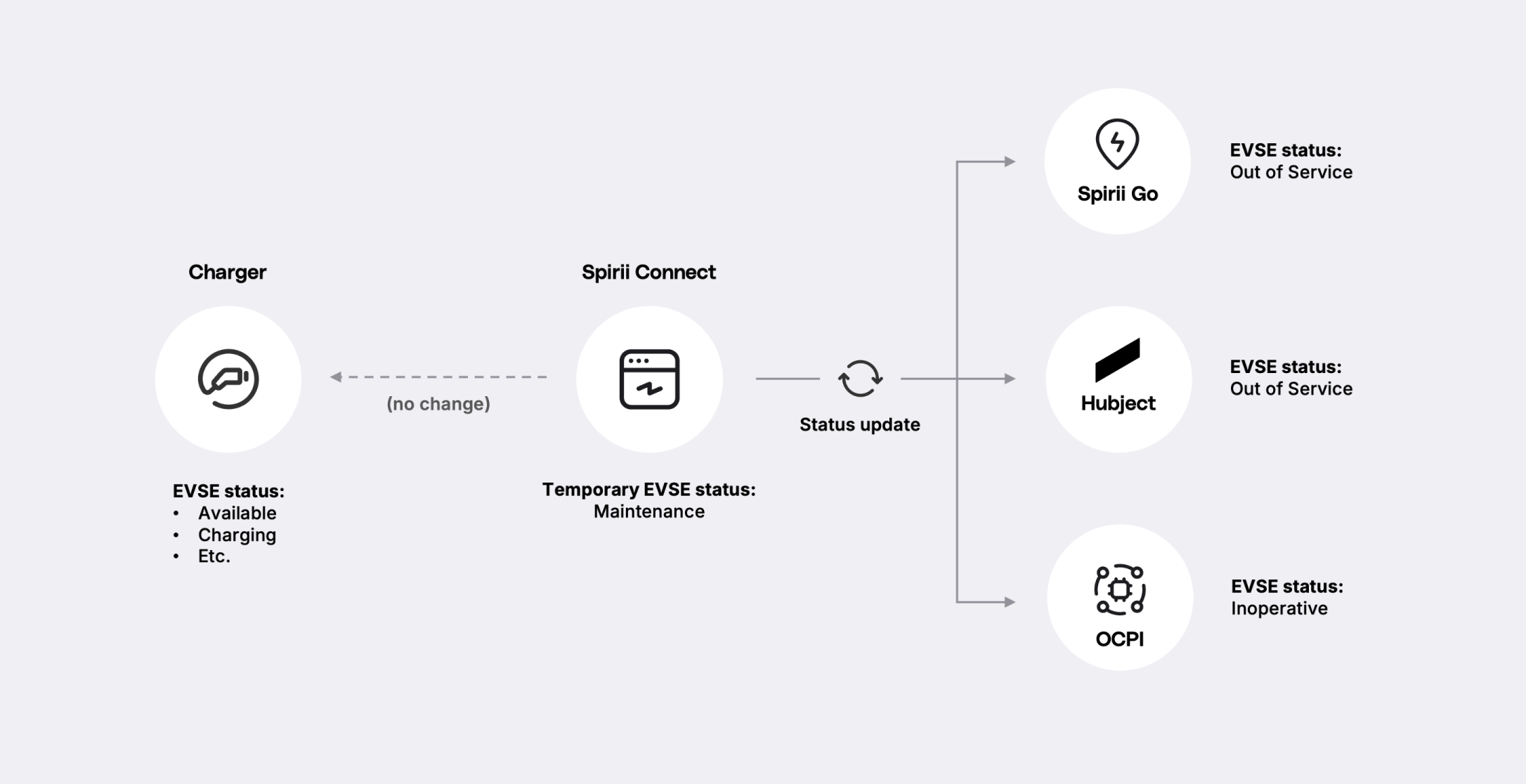
How it works
You apply a temporary status to a single EVSE, choosing the status and an active period: a start, and an optional end. It takes effect at the start and clears automatically at the end; leave the end open and it holds until you remove it. Clearing it (at the end of the period, or with aremove call before then) reverts the displayed status to the charger’s actual state.
Setting a temporary status takes the same access as remote commands. Any role that can run those can set one.
Whatever status you set is translated into each channel’s own vocabulary before it reaches a driver. The table below shows exactly what they see.
In Spirii Connect, the temporary status sits alongside the actual status in the charge box list. You watch the real one while drivers see the override. During a maintenance test you can confirm the unit is charging cleanly even as every app reports it out of service.
For example, you set EVSE DE*SPI*E00012345 to Maintenance for a two-hour service window. In Spirii Go and to roaming partners the unit shows as out of service. No driver arrives expecting to charge, and your technician runs test sessions on it throughout.
Operator-set statuses: Maintenance and Commissioning
These are the statuses an operator controls directly, in Connect or through the API.Maintenance
Maintenance
Covers a unit being serviced or tested. Drivers see it as out of service and none turn up expecting to charge, while it stays live for the technician.
Commissioning
Commissioning
Covers a newly installed unit that isn’t ready for drivers yet. It shows as out of service (or Planned to OCPI partners), keeping it off drivers’ radar until you publish it properly.
create the status against the EVSE ID.
System-driven statuses: Blocked and Reserved
These come in through the API, letting a platform in your wider ecosystem drive them in real time.Blocked
Blocked
For a parking-sensor integration. When a sensor detects a vehicle occupying the bay in front of the charger, it sets the EVSE blocked, and drivers see the unit as occupied.
Reserved
Reserved
For a booking or reservation platform. When a charger is reserved ahead of time, the platform sets it reserved, and drivers see it as reserved.
create call as the operator statuses. The difference is that a system, rather than a person, sets them.
An EVSE carries one temporary status at a time. Setting a new one replaces whatever is already there, so a status arriving from an external system overwrites one an operator set by hand, and the reverse. Plan for that where a booking or sensor integration runs against sites your technicians also work on.
How the status appears to drivers
Each app, hub, and protocol carries its own status vocabulary, so the status you set is mapped to the nearest equivalent on each channel. This is what a driver actually sees:Dependencies & limitations
- Displayed status only. A temporary status never changes the charger’s real state or interrupts an active session — the charger keeps reporting its true status, and you keep seeing it in Connect. To change the real state rather than the displayed one, use the change availability command instead.
- One status per EVSE. You set it per EVSE, never across a whole charge box or location, and a new status replaces any existing one on that EVSE.
- Blocked and Reserved are API-only. Operators set Maintenance and Commissioning in Connect or the API; Blocked and Reserved arrive through the API, typically from an external system.
- Translation is fixed per channel. You choose the Spirii status; how it appears on each channel follows the table above and isn’t separately configurable.
Related
EVSEs and connectors
The object a temporary status targets, and where its real status lives.
Roaming
The channels a temporary status is translated across before it reaches a driver.
Remote commands
The change availability command, for when you need to change a charger’s real operational state rather than its displayed one.
Temporary EVSE status API
Create, update, and clear statuses programmatically.