

Overview
A home charging session is an expense claim the employee never has to file. The work is in producing that claim: knowing which sessions on a private charger belong to the company car, what they were worth, and which ones need correcting before anyone is paid. Spirii handles the attribution and the pricing, and gives fleet managers a view to check and adjust before they approve. Paying employees directly for energy can count as money remittance, which is a regulated activity. That is why disbursement through Spirii runs via Paytech, a licensed PSP. Running reimbursement through payroll instead is often the better route, and it keeps every payment to an employee in one place.How it works
Setup
1
Agree terms with the CPO
The fleet company and their CPO agree the terms for home charging reimbursement.
2
Onboard the employees
Each employee’s home charger is connected to the platform, and they are issued a charge key.
3
Attach a Company Car agreement
Each employee’s home charger location gets a Company Car agreement, which links it to the fleet company and holds the terms that employee is reimbursed on.
The monthly cycle
1
Employees charge at home
Each session is attributed to the employee through their charge key or, where the location reimburses all sessions, through the location itself.
2
Spirii aggregates the month
The billing engine collects each employee’s home charging sessions for the period.
3
Spirii generates the expense report
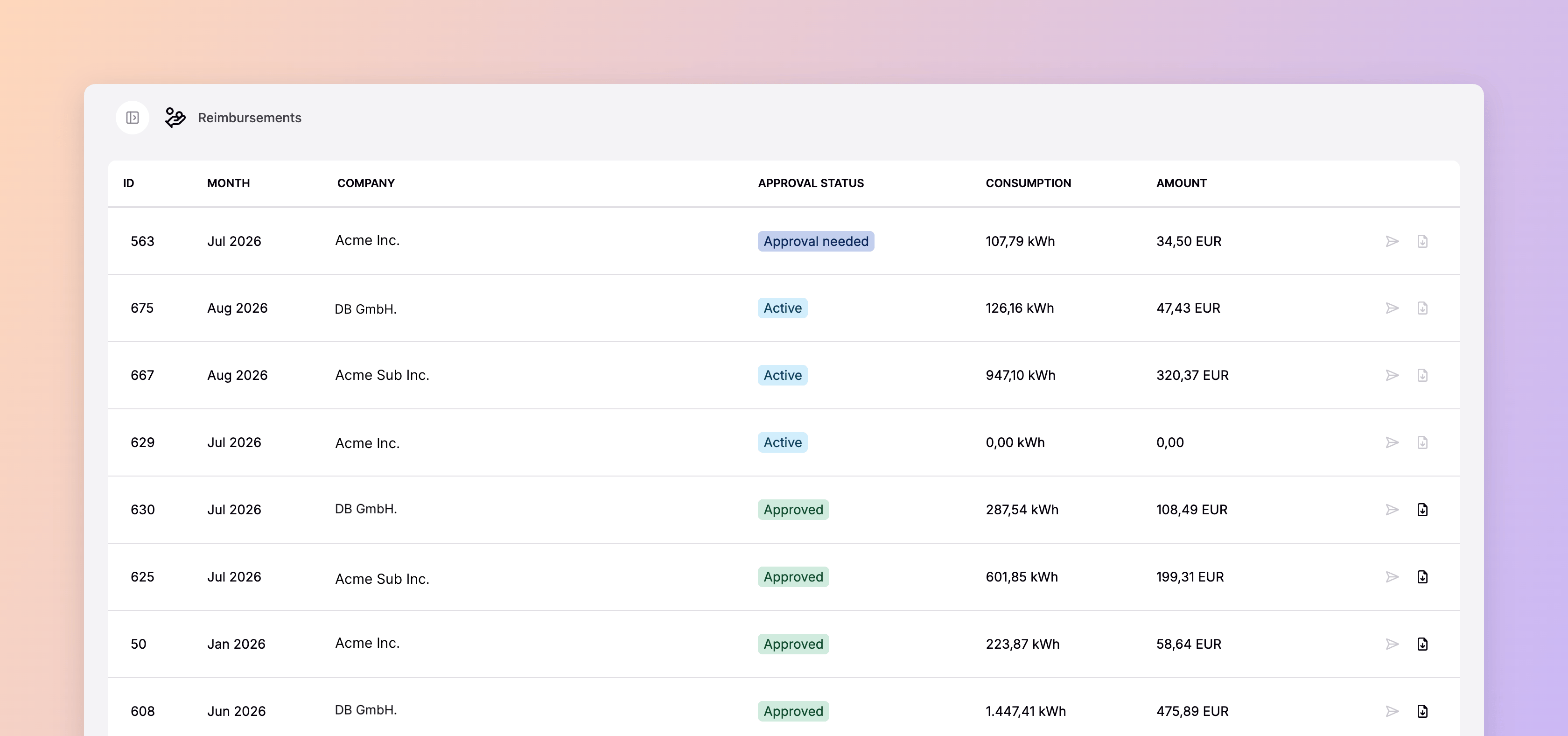
A Fleet Expense Report shows each employee’s total consumption and the amount owed to them, and goes to the fleet manager for review.
4
The fleet manager approves
With any corrections applied first, such as a session that went unattributed.
Paying the employees
- Through payroll
- Through Spirii's PSP
The fleet company takes the approved report and adds the amounts to payroll. Employees receive their individual expense reports directly, so they know what to expect in their next pay run.
The Company Car agreement
A Company Car agreement is a financial agreement with its type set to Company car. You create it, or change an existing agreement’s type, when setting up the employee’s home location in Spirii Connect. Everything about how that employee is reimbursed sits on it.Reimbursement rates
The rate an employee is paid per kWh is set on their home location: on the location’s Rates tab in Connect, or through the Reimbursement rates API. A rate created in one appears in the other. Where a location has a rate, it is used instead of the rate on the Company Car agreement, and a location without one keeps using the agreement rate. Each rate has a start date, an optional end date, a currency, and a price per kWh, so changing what you pay applies from the date you set rather than rewriting earlier months. A rate whose period conflicts with another rate on the same location is rejected when you save it. Supporting evidence, such as an electricity bill, is attached to the rate itself, where it can back the rate in a validation or a tax audit. Once a rate has been used in an expense report, it locks. An approved report cannot change because someone edited the rate behind it.What fleet managers see
Fleet managers get a full view of home charging activity in Connect:- Every session per employee, with energy consumed and the reimbursement amount
- The reimbursement rate applied to each session, in its CDR details
- The rates set on each employee’s home location
- The monthly Fleet Expense Report, before and after approval
- The status of individual reimbursements
Getting the report
A Fleet Expense Report reaches you by whichever route fits your payroll or expense process.- Email. Sent as a PDF to the invoice email set on the fleet customer.
- Download in Connect. The same report as a PDF, or as a CSV for a payroll or expense tool.
- Public API. Retrieve reports programmatically with the Reimbursement expenses API.
What employees see
Employees charge at home and receive a monthly expense report confirming the amount reimbursed. No manual claims, no receipts to keep. Where the location reimburses all sessions, they don’t need to start a session with their charge key either.Dependencies & limitations
- Sessions need a charge key, unless the location reimburses all sessions. By default, only sessions started with a charge key are reimbursed, so a forgotten tap, or a charger in free-vend mode, leaves sessions out of the expense report. Turning on Reimburse all sessions to the location owner, in the Reimbursement section when you create or edit the location in Connect, reimburses every session recorded at the location instead. It’s off by default.
- Reimbursing all sessions covers everyone who charges there. The setting applies to the whole location, with no per-driver or per-connector control, so a session charged by someone else is reimbursed to the location owner too. Use it where one driver charges at the location, and keep reimbursement on charge key sessions where more than one does.
- The location owner must be the employee. Not the fleet company and not the CPO. Setting the company as owner because it bought the hardware is the common mistake, and it stops sessions being attributed.
- The location needs a Company Car agreement. Without one attached in Connect, its CDRs are not eligible for reimbursement.
- A rate locks once it is used. After an expense report references a rate, that rate is fixed. Correcting a past month means working with the report, not the rate.
- Rates are a flat price per kWh. Variable contracts such as spot-price tariffs, day and night pricing, and regulated rates aren’t supported. A rate must be above 0 and no higher than 10 per kWh, with at most four decimals, and the maximum is the same in every currency.
- Rates are deleted through the API. Connect adds and edits rates but doesn’t delete them. Delete an unlocked rate with the Reimbursement rates API.
- Spirii-disbursed payouts wait on KYC. Where the PSP pays employees, expense reports still generate before the fleet company’s KYC completes, but no money moves until it does.
Related
Home charging setup guide
Configure operators, employees, and chargers for reimbursement.
Home and work charging
The wider picture for company cars across home, workplace, and public charging.
Charge key billing
How public and workplace charging is billed to the fleet company.
Reimbursement expenses API
Retrieve expense reports and expenses programmatically.