

Overview
A vehicle plugged in at 18:00 charges at 18:00, at whatever electricity costs then — even when nobody needs it until six the next morning. On a depot with twenty vehicles doing that every evening, the difference between charging at the day’s peak and charging at its trough is most of the energy bill. Scheduled charging closes that gap. You define a schedule against the connectors at a location and the platform holds the session, releasing power only when the schedule says so. Drivers plug in as usual and see a connected but idle session until charging starts. It runs in two modes.Scheduled
Use it when you know the hours you want charging to happen in — a fixed night tariff, or a window that suits the depot’s shifts.
Price optimised
Use it when prices move through the day and vehicles are plugged in for longer than they need. The platform finds the cheapest intervals for you.
How it works
For a price-optimised schedule, the platform divides the window into 15-minute intervals, fetches electricity prices for the market the location sits in, and selects the cheapest intervals that add up to the charging hours you asked for. It then sends the charger a charging profile telling it when to deliver power and when to pause. While a session is held, the connector reportsSuspendedEVSE — the vehicle is ready and the charger is deliberately not offering current. In Connect’s ongoing sessions view it shows as suspended rather than charging, which is expected and not a fault.
A worked example
A logistics depot’s vans return between 17:00 and 19:00 and leave at 06:00. The operator sets a window of 19:00 to 06:00 with six charging hours and price optimisation on. A van plugged in at 17:30 sits connected and idle until the platform’s first selected interval, charges through the cheapest six hours of the night in 15-minute blocks, and is full before the shift starts. Nobody on the team decided anything after the van was plugged in.Where it sits against the other capabilities
Scheduled charging has the lowest precedence of the local energy capabilities. DLM, programmatic charger control, prioritised charging and grid balancing can all reduce or pre-empt power during an interval the schedule had selected.If enough intervals are cut short by a capability above it, the full charging duration you asked for may not be delivered within the window. On a busy shared circuit, leave more window than the bare minimum.
Options and configuration
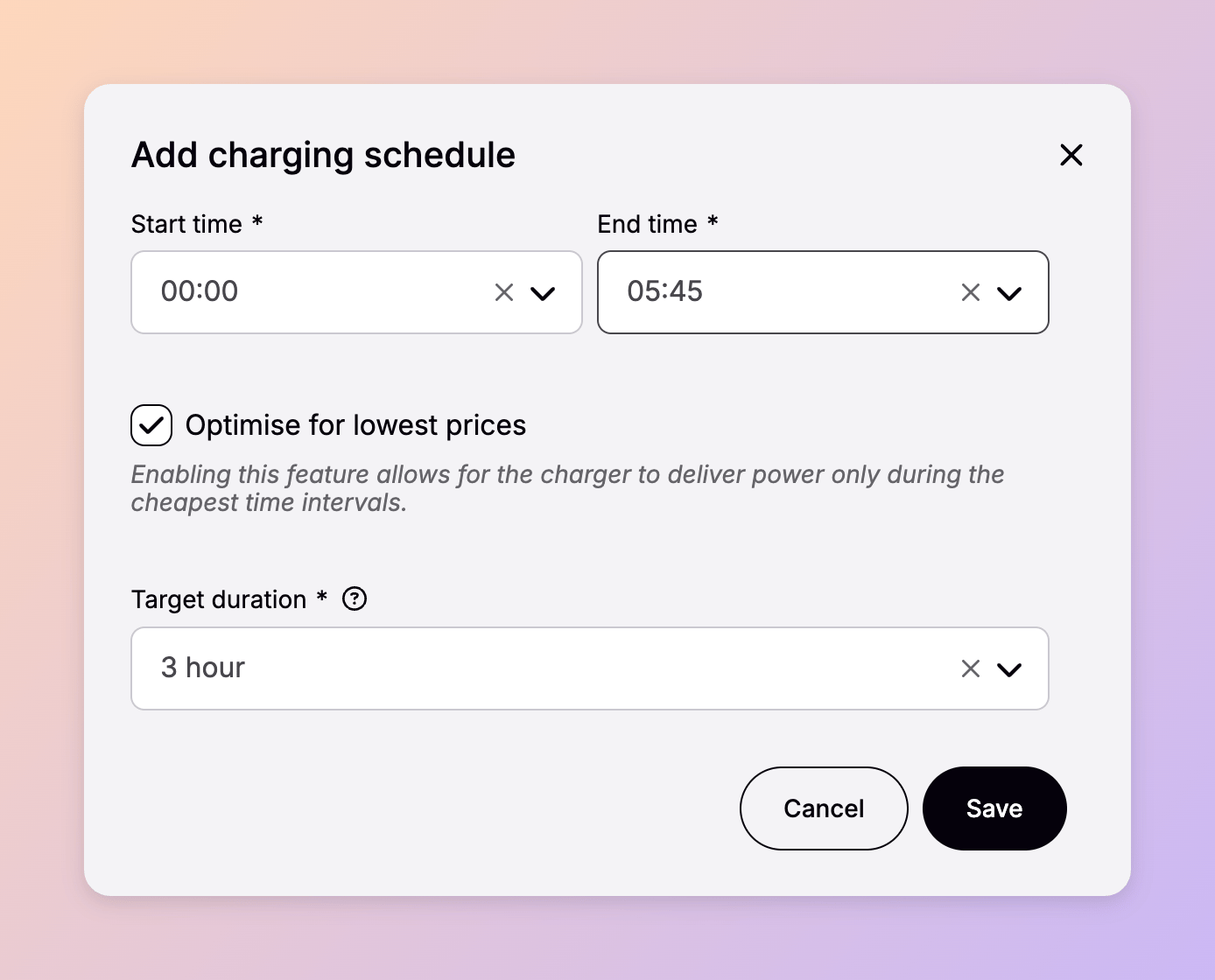
Schedules are created on a location’s Power management tab in Connect and assigned to connectors there. What you set:
Editing a schedule affects the next transaction, not the one in progress. The same holds for deleting one: a session already running is left alone.
Who can do what follows the standard Connect roles.
For drivers charging at home or on a company car charger, the same logic is available in Spirii Go, set by the driver on their own charger.
Overriding a schedule
When a vehicle needs charging now, open the ongoing session in Connect and choose Override schedule; drivers do the same from the session view in Spirii Go. Charging starts immediately, and the override applies for the rest of that transaction — including any later windows, if the vehicle stays plugged in across days. Unplugging and starting a new session returns to normal scheduled behaviour.When to use it
A depot fleet on spot prices
A depot fleet on spot prices
Vehicles stand for eleven hours and need four. Price optimisation takes the difference straight off the energy bill.
A site with a night tariff
A site with a night tariff
Fixed hours are enough here; there are no intra-day prices to chase.
Home and company car charging
Home and company car charging
Drivers set it once in Spirii Go and stop thinking about it.
Set up
1
Confirm the charger models are validated
Schedules can only be assigned to connectors on models Spirii has validated for smart charging. Connect flags anything else as incompatible when you try.
2
Open the location's Power management tab in Connect
Schedules live with the location, not with the individual charger.
3
Create the schedule
Set the window, switch on price optimisation if you want it, and enter the charging hours needed.
4
Assign it to the connectors
The schedule takes effect on the next session at those connectors.
Dependencies and limitations
- Price optimisation needs price data for the market. It is available in Austria, Belgium, Denmark, Estonia, Finland, France, Germany, Latvia, Lithuania, the Netherlands, Norway, Poland, Portugal, Spain, Sweden and the United Kingdom. Elsewhere, the cheapest intervals can’t be calculated.
- One schedule per connector, and schedules can’t overlap. Connect and the platform both refuse an overlapping assignment.
- Schedules are assigned per location. There’s no way to apply one schedule across chargers at several locations in a single action.
- A vehicle still connected when the window closes stays suspended. Power doesn’t resume until the next window starts or someone overrides.
- The full duration isn’t guaranteed. Capabilities above scheduled charging in the precedence order can take back intervals it had selected.
- Validated models only, and validation is per model and per firmware version. A charger that has never connected to Spirii also shows as incompatible until it establishes its first OCPP connection.
Charger requirements in detail
Charger requirements in detail
The charger has to accept and apply charging profiles from Spirii. In practice that means:
Claimed support and working support are not the same thing, which is why validation is tested per model rather than read off a datasheet.
Related
Dynamic load management
The circuit limit every schedule works inside.
Prioritised charging
A prioritised charge key skips the schedule and charges immediately.
Pricing options and logic
What the driver pays is set separately from when the vehicle charges.
Spirii Go and branded apps
Where drivers set and override schedules on their own charger.