

Overview
Why a tariff changed, who removed a location from a voucher group, when a price was last edited: those questions come up after the fact, and Connect logs the changes as they happen. Two surfaces reach that record.Change history log
A tab in Connect on locations, voucher groups, and tariffs, showing field-level edits in place.
Audit log API
The same records, filterable by user, address, record type, event, and date range.
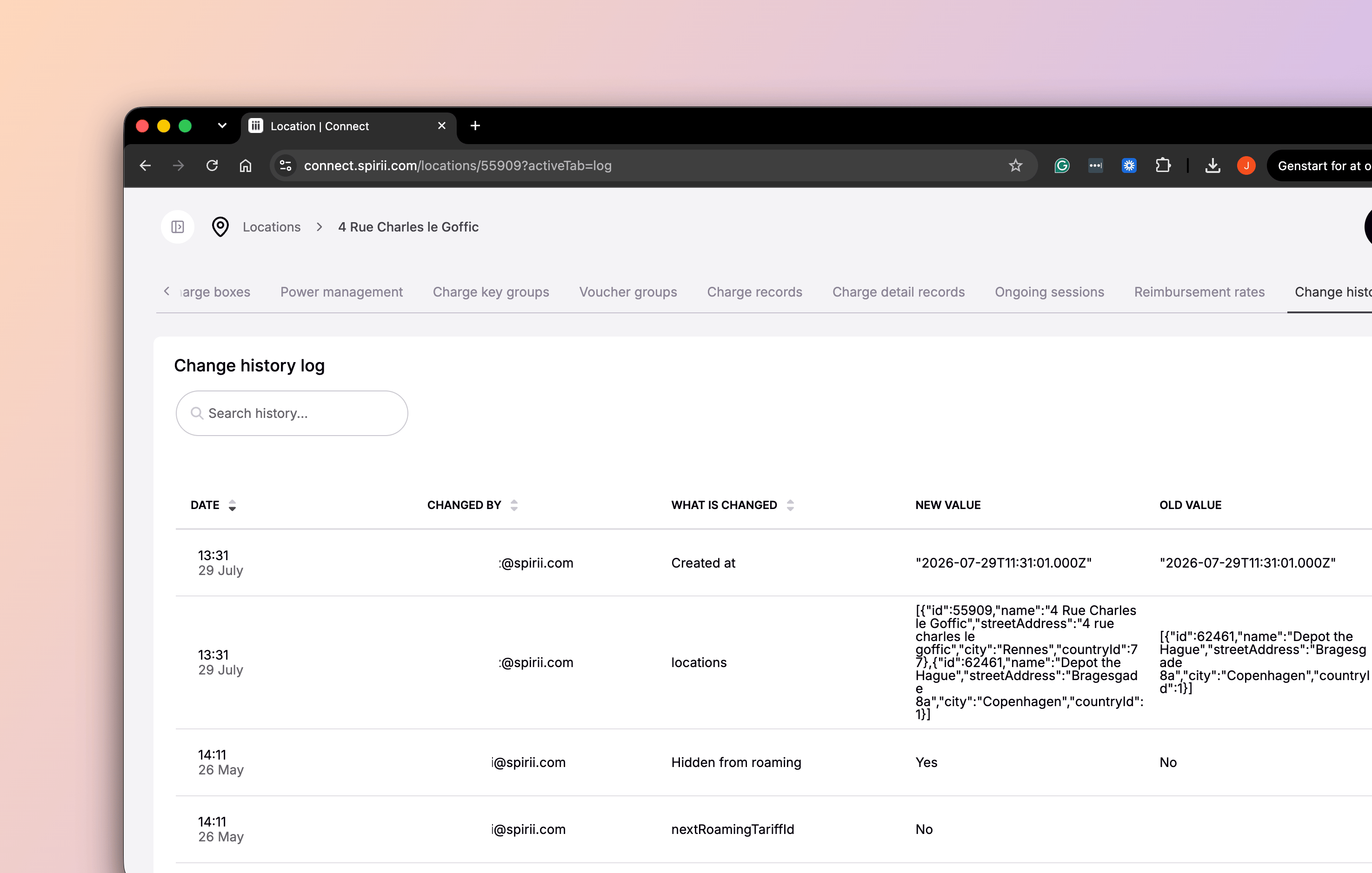
Change history in Connect
Locations, voucher groups, and tariffs each carry a Change history log tab, listing the edits made to that record.What a row shows
Changes are attributed to the signed-in user who made them. Where an operator is impersonating a customer, the row names the operator’s own user rather than the customer.
The tab is scoped to the record in front of you, so a location’s history covers the location’s own fields. Record creation, deletion, and association events are reachable through the API rather than here.
The audit log API
GET /v2/audit-logs returns the recorded changes, including the event types and record types the Connect view does not surface.
What a change record contains
Event types
On an association event, the record also names the type of record on the other end of the link.
Filtering
Filters cover the questions an investigation usually starts from:- Who — by user email or user ID
- Where from — by IP address
- What — by record type, record ID, or event type
- When — a date range, with cursor pagination for large result sets
What is covered
Change history is the record of edits made in Connect. Each entry accounts for one change, with the user, the values, and the timestamp behind it. Its scope is those edits. Updates written programmatically through the public API are separate, so where changes are automated your own systems hold the record of them. Charger-level activity is separate too. Actions and configuration changes on a charge box, and the settings a driver adjusts on their own residential charger, are not change-history events. Read a record’s entries as the account of its Connect activity.Dependencies & limitations
- Change history covers edits made in Connect. Updates through the public API are separate.
- The Connect view covers three record types. Locations, voucher groups, and tariffs. The API reaches the rest.
- The Connect view shows edits only. Record creation, deletion, and association events are in the API rather than the tab.
- Charger-level activity is separate. Actions and configuration changes on a charge box are not change-history events.
- No retention window applies. Change records are not aged out on a schedule, so history reaches back as far as the record itself.
Related
To see who is able to make changes in the first place, start with the roles you have granted.Team access
The roles that decide who can change what.
Impersonation
How changes are attributed when acting in a customer’s context.
Data separation
Which records a user can reach, and whose driver details they can see.
Audit logs API
Endpoint reference, parameters, and response schema.