> ## Documentation Index
> Fetch the complete documentation index at: https://docs.spirii.com/llms.txt
> Use this file to discover all available pages before exploring further.
# Pricing options and logic
> Build the price a driver pays — fixed or dynamic, with conditional fees — and set the price you send to roaming.
Pricing options and logic is how you build what a driver pays to charge: a fixed or dynamic base price, conditional fees layered on top, and a separate price for roaming.
 ## Overview
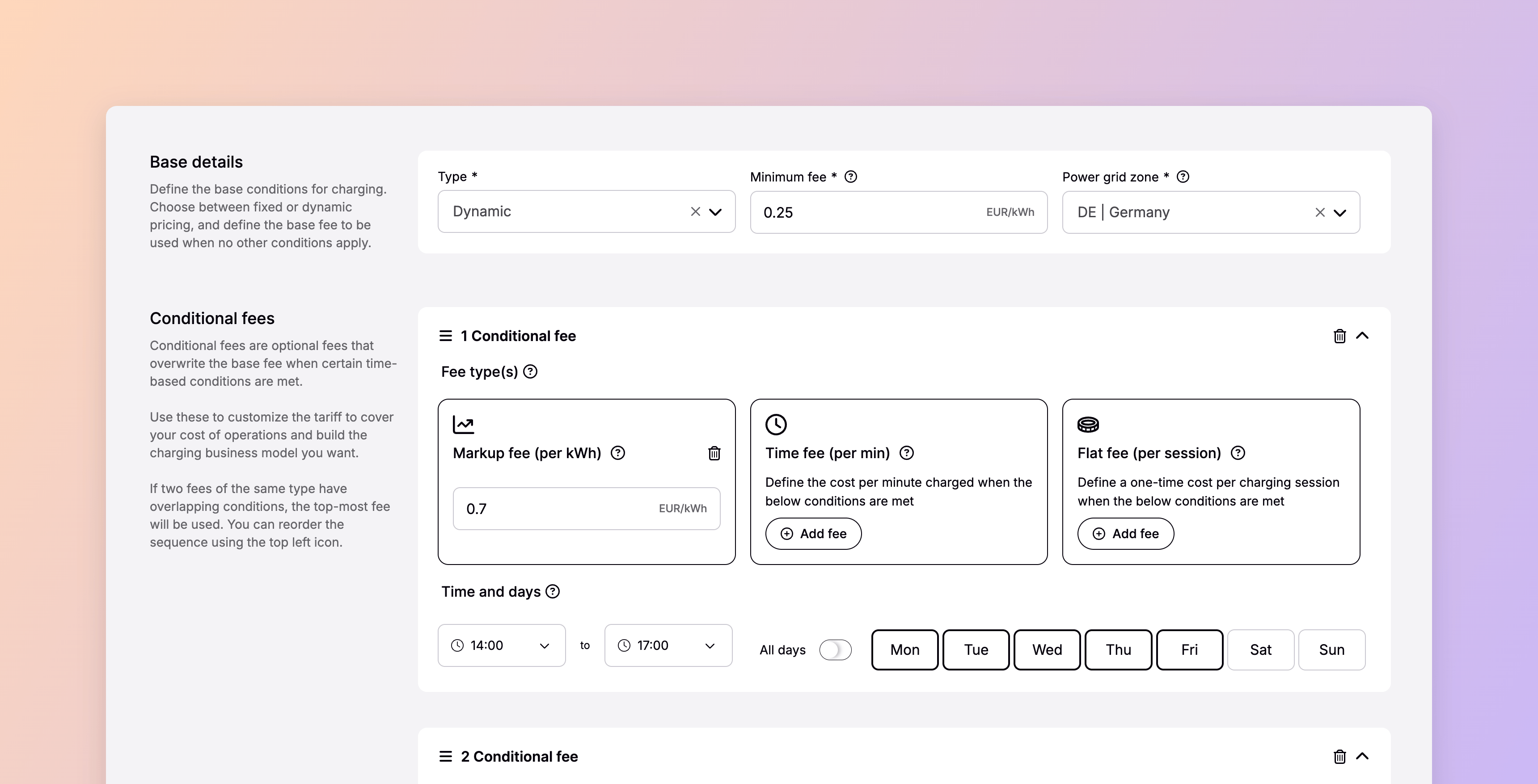
A tariff composes a price from two parts: a **base fee** that always applies, and optional **conditional fees** that take over when their conditions are met. You build it once and apply it to as many locations as you like. Separately, you set a **roaming tariff** — the price external networks are billed when their drivers charge at your locations.
## How it works
### The base fee
Every tariff starts with a base fee, in one of two modes:
A set price per kWh or per minute that doesn't change.
The hourly spot price for a power grid zone, with your markup on top.
Fixed keeps the price predictable; dynamic lets it track your wholesale electricity cost through the day.
For dynamic, a minimum fee acts as the floor and the fallback if spot data drops too low or goes missing.
### Conditional fees
On top of the base, you can add conditional fees that apply only when their conditions are met:
Per kWh — on a dynamic tariff, this is the markup over spot.
Per minute — charged per minute of the session.
Per session — a one-time charge.
Each fee can be limited to specific **timeslots and days**, or set to apply only **after a session has run** for a set time — counting both active charging and idle time once the car is full.
### How fees resolve
When fees overlap, two rules keep the price predictable:
* Fees are read **top to bottom**, so their order matters. A fee with a longer delay should sit above one with a shorter delay, since the shorter delay is reached first.
* If two fees of the **same type** have overlapping conditions, only the top-most applies — so a session is never charged twice for the same thing.
Every price is shown to the driver gross, including VAT.
## Common pricing patterns
A few patterns cover most needs:
Set the base fee to your lowest (night) rate, then add energy fees for the daytime and peak periods using timeslots — mirroring how electricity costs rise and fall through the day.
Add a time fee that switches on after, say, 180 minutes, so a driver who's finished charging is nudged to move on. Limit it to the hours where it matters; the driver is warned in the app before it starts.
Stack time fees with increasing apply-after delays — for example free for the first hour, a per-minute fee after 60 minutes, and a higher one after 120 — to keep a busy site turning over.
Add a flat fee, at the start or after a delay, where a one-time charge fits the model.
## Roaming pricing
The price you set toward external networks is separate from your tariff, and simpler. You set a **roaming tariff** per location — a single flat rate per kWh, chosen from a pre-made list rather than built from scratch:
* You enter it **gross** (including VAT for the location's country) so it's comparable with your tariff, but eMSPs are billed the **net** amount. A 1.00 € roaming tariff in a country with 25% VAT reaches the eMSP as 0.80 €.
* Changes take effect at **midnight**; until then the current roaming tariff stands. Selecting **No Roaming** turns it off for the location.
* Roaming partners add their own margin on top, so a driver arriving over roaming may see a higher price than your roaming tariff.
## Set up
Build tariffs under **Tariffs** in Connect — set the name, currency, and base fee, add any conditional fees, then bind the tariff to your locations. Set the roaming tariff separately, on each location. A tariff applies the moment it's bound; a roaming tariff change applies at the next midnight.
## Dependencies & limitations
* **Tariffs apply within Spirii's own surfaces** — Spirii Go, branded apps, Spirii tokens, and Spirii POS. External networks receive the roaming tariff instead.
* **The roaming tariff is a flat per-kWh price only**, billed net to eMSPs, effective at midnight, with partner margin added on top.
## Related
The tariff object this builds on.
How the roaming tariff reaches external networks.
Tariffs and roaming tariffs are applied per location.
Where the price a tariff produced is recorded.
## Overview
A tariff composes a price from two parts: a **base fee** that always applies, and optional **conditional fees** that take over when their conditions are met. You build it once and apply it to as many locations as you like. Separately, you set a **roaming tariff** — the price external networks are billed when their drivers charge at your locations.
## How it works
### The base fee
Every tariff starts with a base fee, in one of two modes:
A set price per kWh or per minute that doesn't change.
The hourly spot price for a power grid zone, with your markup on top.
Fixed keeps the price predictable; dynamic lets it track your wholesale electricity cost through the day.
For dynamic, a minimum fee acts as the floor and the fallback if spot data drops too low or goes missing.
### Conditional fees
On top of the base, you can add conditional fees that apply only when their conditions are met:
Per kWh — on a dynamic tariff, this is the markup over spot.
Per minute — charged per minute of the session.
Per session — a one-time charge.
Each fee can be limited to specific **timeslots and days**, or set to apply only **after a session has run** for a set time — counting both active charging and idle time once the car is full.
### How fees resolve
When fees overlap, two rules keep the price predictable:
* Fees are read **top to bottom**, so their order matters. A fee with a longer delay should sit above one with a shorter delay, since the shorter delay is reached first.
* If two fees of the **same type** have overlapping conditions, only the top-most applies — so a session is never charged twice for the same thing.
Every price is shown to the driver gross, including VAT.
## Common pricing patterns
A few patterns cover most needs:
Set the base fee to your lowest (night) rate, then add energy fees for the daytime and peak periods using timeslots — mirroring how electricity costs rise and fall through the day.
Add a time fee that switches on after, say, 180 minutes, so a driver who's finished charging is nudged to move on. Limit it to the hours where it matters; the driver is warned in the app before it starts.
Stack time fees with increasing apply-after delays — for example free for the first hour, a per-minute fee after 60 minutes, and a higher one after 120 — to keep a busy site turning over.
Add a flat fee, at the start or after a delay, where a one-time charge fits the model.
## Roaming pricing
The price you set toward external networks is separate from your tariff, and simpler. You set a **roaming tariff** per location — a single flat rate per kWh, chosen from a pre-made list rather than built from scratch:
* You enter it **gross** (including VAT for the location's country) so it's comparable with your tariff, but eMSPs are billed the **net** amount. A 1.00 € roaming tariff in a country with 25% VAT reaches the eMSP as 0.80 €.
* Changes take effect at **midnight**; until then the current roaming tariff stands. Selecting **No Roaming** turns it off for the location.
* Roaming partners add their own margin on top, so a driver arriving over roaming may see a higher price than your roaming tariff.
## Set up
Build tariffs under **Tariffs** in Connect — set the name, currency, and base fee, add any conditional fees, then bind the tariff to your locations. Set the roaming tariff separately, on each location. A tariff applies the moment it's bound; a roaming tariff change applies at the next midnight.
## Dependencies & limitations
* **Tariffs apply within Spirii's own surfaces** — Spirii Go, branded apps, Spirii tokens, and Spirii POS. External networks receive the roaming tariff instead.
* **The roaming tariff is a flat per-kWh price only**, billed net to eMSPs, effective at midnight, with partner margin added on top.
## Related
The tariff object this builds on.
How the roaming tariff reaches external networks.
Tariffs and roaming tariffs are applied per location.
Where the price a tariff produced is recorded.