> ## Documentation Index
> Fetch the complete documentation index at: https://docs.spirii.com/llms.txt
> Use this file to discover all available pages before exploring further.
# Home charging reimbursement
> Automatically reimburse employees for charging their company car at home — compliant and without manual admin.
Home charging reimbursement lets fleet companies pay employees back for the electricity they use to charge their company car at home. Spirii automates the calculation and generates expense reports totalling the amounts to reimburse each employee.
The reimbursement payment can be performed by the fleet company's payroll, or through Spirii using a licensed Payment Service Provider to stay on the right side of money remittance regulations.
 ## The problem it solves
Reimbursing employees for home electricity is as simple as a standard expense claim. Knowing how to generate that claim is more complex, this is what Spirii helps fleet customers automate.
The Spirii Platform ensures each charge session is attributed with an estimated cost for reimbursement and provides tooling for Fleet Managers to easily overview and correct any potential issues
with expenses before approving.
Directly transferring money to employees for energy costs can constitute money remittance — a regulated financial activity. Spirii's solution is designed to handle this compliantly, using a licensed PSP (Paytech) as the disbursement partner. It is also
possible, and many times advised, to perform expense reimbursements as part of payroll. This ensures the fleet company has a single view of all payments made to their employees.
## How it works
### Setup
1. The fleet company agrees to the home charging reimbursement service terms with their CPO.
2. Employees are onboarded: their home charger is connected to the platform and they are issued a token.
3. Each employee's home charger location is given a Company Car agreement in Spirii Connect, linking it to the fleet company.
### Monthly cycle
1. Throughout the month, employees charge their company car at home using their registered token. The charger records the sessions and associates them with the employee.
2. Spirii's billing engine aggregates each employee's home charging sessions for the month.
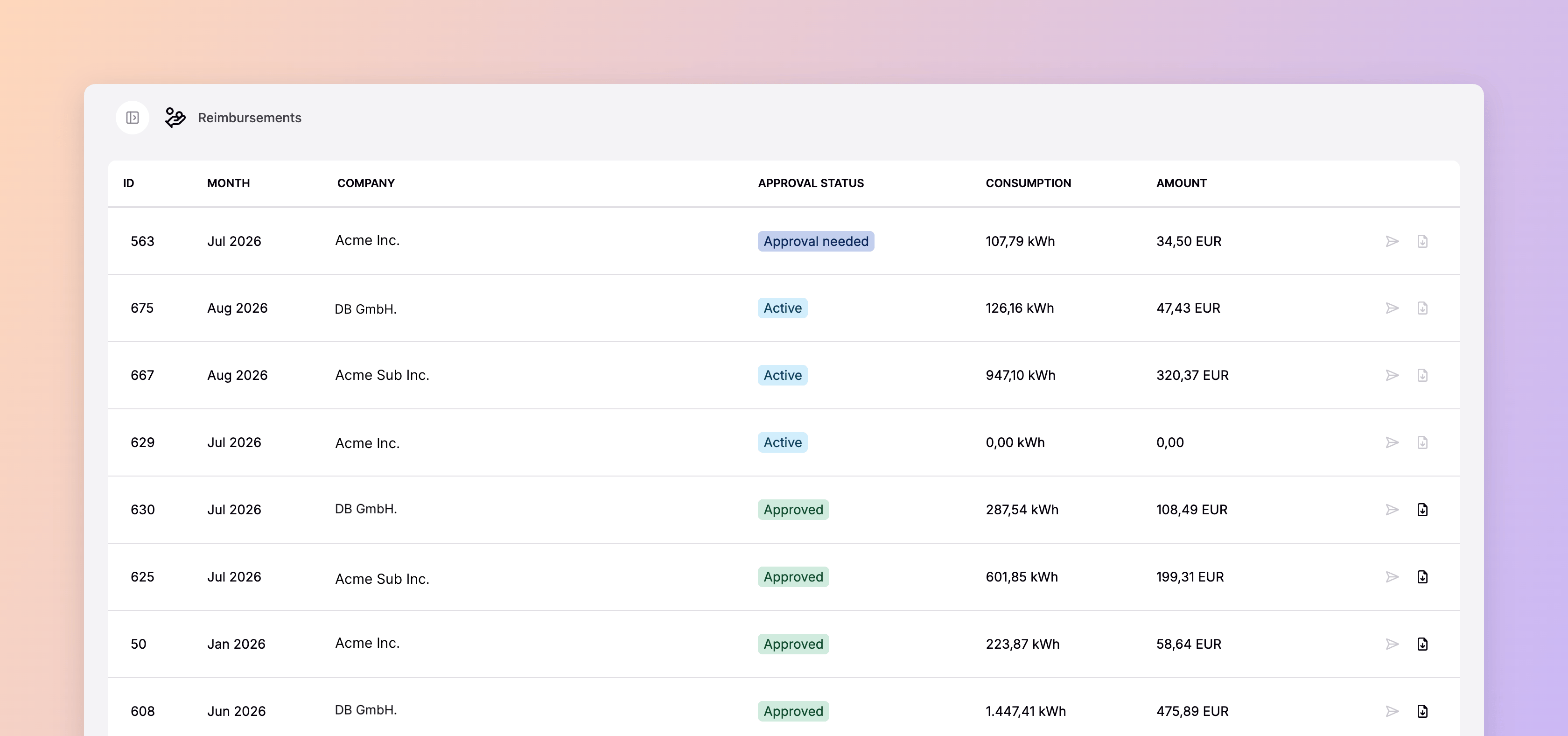
3. Spirii generates a **Fleet Expense Report** — a document showing each employee's total home charging consumption and the reimbursement amount — and sends it to the fleet manager for review.
4. The fleet manager approves the report.
#### With reimbursement payment managed by the fleet company
5. Fleet company processes the expense report and adds payment to payroll.
6. Employees receive their individual expense reports directly so they know what payment to expect next payroll.
#### With reimbursement payment managed by Spirii
5. Fleet company transfers the total reimbursement amount to a dedicated settlement account held by the PSP.
6. Once the funds are received, the PSP automatically disburses individual reimbursement amounts to each employee's registered bank account (IBAN).
7. Each employee receives an individual expense report confirming their reimbursement.
## What fleet managers see
Fleet managers have a full view of home charging activity in Spirii Connect:
* All sessions per employee, with energy consumed and reimbursement amount
* The monthly Fleet Expense Report before and after approval
* Status of individual reimbursements
Managers can also manually add or remove sessions from an expense report before approving — for example, if a session was not automatically attributed due to a missing authentication.
## What employees see
Employees charge with their key and receive a monthly expense report confirming the amount reimbursed to their bank account. They do not need to submit manual claims or keep receipts.
## Requirements
For a CDR to be eligible for reimbursement:
* The charger location must have a **Company Car agreement** attached in Spirii Connect
* The **location owner** must be the employee (not the fleet company or CPO)
* The session must be **authenticated** with the employee's token
Home chargers must be configured to require authentication (not free-vend mode). Sessions without authentication cannot be automatically attributed to an employee and will not appear in the expense report.
## Related
Configure operators, employees, and chargers for reimbursement.
How public and workplace charging is billed to the fleet company.
How the billing engine processes sessions into expense reports.
## The problem it solves
Reimbursing employees for home electricity is as simple as a standard expense claim. Knowing how to generate that claim is more complex, this is what Spirii helps fleet customers automate.
The Spirii Platform ensures each charge session is attributed with an estimated cost for reimbursement and provides tooling for Fleet Managers to easily overview and correct any potential issues
with expenses before approving.
Directly transferring money to employees for energy costs can constitute money remittance — a regulated financial activity. Spirii's solution is designed to handle this compliantly, using a licensed PSP (Paytech) as the disbursement partner. It is also
possible, and many times advised, to perform expense reimbursements as part of payroll. This ensures the fleet company has a single view of all payments made to their employees.
## How it works
### Setup
1. The fleet company agrees to the home charging reimbursement service terms with their CPO.
2. Employees are onboarded: their home charger is connected to the platform and they are issued a token.
3. Each employee's home charger location is given a Company Car agreement in Spirii Connect, linking it to the fleet company.
### Monthly cycle
1. Throughout the month, employees charge their company car at home using their registered token. The charger records the sessions and associates them with the employee.
2. Spirii's billing engine aggregates each employee's home charging sessions for the month.
3. Spirii generates a **Fleet Expense Report** — a document showing each employee's total home charging consumption and the reimbursement amount — and sends it to the fleet manager for review.
4. The fleet manager approves the report.
#### With reimbursement payment managed by the fleet company
5. Fleet company processes the expense report and adds payment to payroll.
6. Employees receive their individual expense reports directly so they know what payment to expect next payroll.
#### With reimbursement payment managed by Spirii
5. Fleet company transfers the total reimbursement amount to a dedicated settlement account held by the PSP.
6. Once the funds are received, the PSP automatically disburses individual reimbursement amounts to each employee's registered bank account (IBAN).
7. Each employee receives an individual expense report confirming their reimbursement.
## What fleet managers see
Fleet managers have a full view of home charging activity in Spirii Connect:
* All sessions per employee, with energy consumed and reimbursement amount
* The monthly Fleet Expense Report before and after approval
* Status of individual reimbursements
Managers can also manually add or remove sessions from an expense report before approving — for example, if a session was not automatically attributed due to a missing authentication.
## What employees see
Employees charge with their key and receive a monthly expense report confirming the amount reimbursed to their bank account. They do not need to submit manual claims or keep receipts.
## Requirements
For a CDR to be eligible for reimbursement:
* The charger location must have a **Company Car agreement** attached in Spirii Connect
* The **location owner** must be the employee (not the fleet company or CPO)
* The session must be **authenticated** with the employee's token
Home chargers must be configured to require authentication (not free-vend mode). Sessions without authentication cannot be automatically attributed to an employee and will not appear in the expense report.
## Related
Configure operators, employees, and chargers for reimbursement.
How public and workplace charging is billed to the fleet company.
How the billing engine processes sessions into expense reports.