> ## Documentation Index
> Fetch the complete documentation index at: https://docs.spirii.com/llms.txt
> Use this file to discover all available pages before exploring further.
# Onboarding flows
> Sell charging hardware and subscriptions online, to consumers or to businesses.
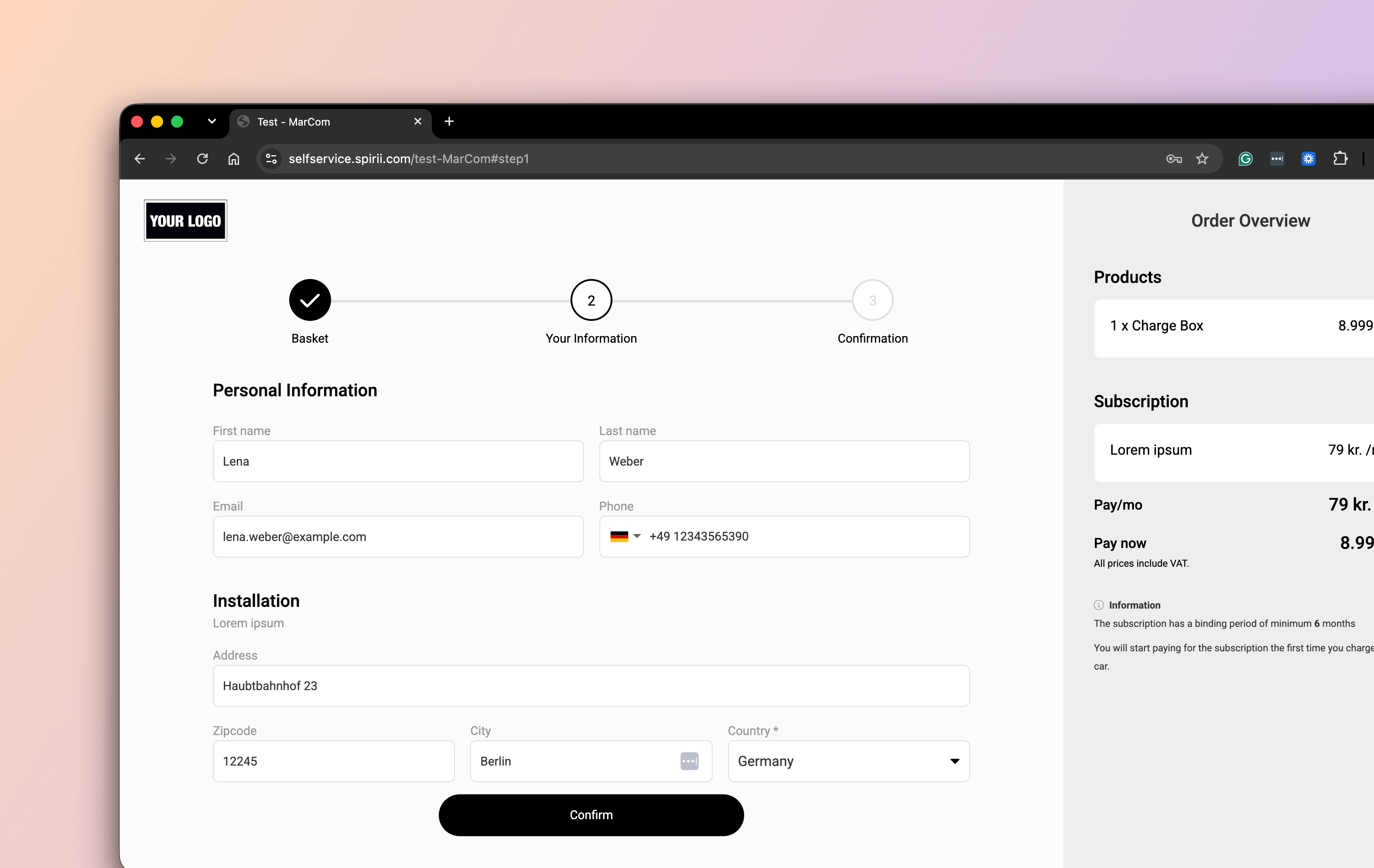
An onboarding flow is a branded ordering experience for charging hardware, subscriptions, and tokens. When a customer completes one, the platform creates and connects everything their setup needs.
 ## Overview
Getting a driver charging at home takes a customer record, a location, an app account, an order, and someone to install the hardware. An onboarding flow produces all of it from one order the customer places themselves.
The same flow serves whoever is ordering:
* **A driver buying for their own home.** They order a charge box and a subscription, and arrive with an app account already attached to their address.
* **An employee ordering through a company scheme.** The employer's flow presents the products the scheme covers, and the resulting records sit under the employer.
* **A business ordering for a site.** A flow set to business customers collects company details and invoices rather than taking a card.
Onboarding flows are configured in the Spirii Business Portal rather than in Connect.
## What a flow creates
A completed order produces the records a charging setup depends on, already bound together.
```mermaid theme={null}
flowchart TD
O("Order completed") --> C("Customer")
O --> L("Location")
O --> AU("App user")
C --> L
AU --> L
```
**A customer**, assigned to the owner and the agreement you set on the flow.
**A location** for the address they gave, residential where the order is for a home.
**An app user**, attached to that location, so a driver ordering a home charge box can control it from the app as soon as it is live. For a business ordering chargers for a site, no app user is needed.
**An order** carrying the products they chose, which is what the installation and activation steps work from.
Associations can be configured too, so an ordered RFID token arrives already bound to the customer.
An employee ordering a home charge box through `Acme Inc.`'s flow therefore becomes a private customer owned by Acme, with a residential location at their own address and an app account attached to it.
## The ordering experience
Optional. A marketing page ahead of the order itself, with your own imagery and sales copy, for flows that need to sell before they collect.
What a customer can order, usually one item at a time: a charge box model, a token, a subscription. Where it helps, several items can be bundled so they present as a single package. For each, you decide whether it is mandatory or an optional add-on, whether its price is shown, and whether a customer can order more than one.
The fields a customer fills in, arranged in groups with their own headings and explanations. You choose each field's type, label, help text, and whether it is required.
Checkboxes a customer accepts before ordering, each with its own text and links. Some block the order until accepted; others, like a newsletter opt-in, do not.
Card or invoice, set per flow. Card payments are processed through Stripe with Spirii as the merchant, so Spirii's name appears on the customer's statement and handles any dispute. On an invoice flow, the customer agrees to be invoiced instead.
A success page with your own imagery and welcome text, or a redirect back to your own site.
### Flow-level settings
| Setting | What it decides |
| ----------- | ------------------------------------------------------------------------------------ |
| Owner | The customer every sign-up is assigned to. Your own account, or a reseller's |
| Agreement | The terms and transaction calculation applied to every customer the flow creates |
| Market type | Whether the flow creates private or business customers |
| URL | The address the flow lives at |
| Language | The language of the flow's buttons, help text, and error messages |
| Branding | Logo, colours, and text across the flow, its landing page, and its confirmation page |
| Success URL | Where a customer lands after paying, if you want them returned to your own site |
## Automated follow-up
A completed order triggers the emails that move the setup along. Each is a template you can write yourself, with its own subject, body, footer, and an optional BCC address for your own records.
| Email | Goes to | Fires when |
| ------------------------- | -------------------- | ---------------------------------------------- |
| Order confirmation | Customer | The order completes |
| Installation information | Customer | Two hours after the order completes |
| Installation request | Installation partner | The order completes |
| Order fulfilled | Customer | The charge box is activated after installation |
| Cancellation confirmation | Customer | A subscription is cancelled |
Order fulfilment is driven by the charge box activating, so a customer is told their charger is live as soon as it is.
Templates can be written once for a flow, or varied per installation partner where different partners need different instructions. Every email the platform sends is logged, so you can see what a customer received and when.
Installation requests route by postcode. Each installation partner has a contact address and a postcode range per flow, so an order reaches whoever covers that area without anyone forwarding it.
An installation partner receives installation requests only for the postcode ranges assigned to them. A partnership with no range set receives none.
## Integration options
You can hand the whole experience to Spirii, keep the storefront and hand over the rest, or build everything and use the platform for what happens after the order.
| | You build | Spirii provides |
| ----------------------- | --------------------------------------- | ---------------------------------------------------------------- |
| **Hosted flow** | Nothing | The whole ordering experience, at your URL and in your branding |
| **Hosted payment page** | The ordering interface on your own site | Card payment, and the records and automation behind it |
| **API and webhooks** | The ordering interface and the payment | The records, the automation, and order events pushed back to you |
The hosted flow is the fastest route to live. The API route suits a partner with an existing website and a checkout they already trust, who wants the automation without a second storefront. The middle option sits between them: your storefront, Spirii's payment page, no card handling on your side.
## Set up
Spirii configures onboarding flows as a service, which is how most partners run them. You can also have your own login to the Business Portal, giving you full configuration of your flows and the ability to manage the orders that come through them.
Customers themselves are managed in Connect. See [Customer management](/capabilities/account/customer-management) for the hierarchy every flow assigns its sign-ups into.
Talk to your account manager to get started.
## Dependencies & limitations
* **Flows are configured in the Business Portal.** Onboarding flows are not set up in Connect, although the customers and locations they create appear there.
* **Postcode ranges gate installation emails.** A partnership without a range sends nothing.
* **Spirii is the merchant for card payments.** Card orders are processed through Stripe under Spirii, which also covers disputes and refunds for them.
* **Payment is card or invoice.** Both are set per flow rather than chosen by the customer.
## Related
The installation request an order sends is the start of the installer's side of the process.
What happens after an installation request, and what an installer does in Connect.
The hierarchy a flow assigns its customers into.
The driver record a flow creates, and how it attaches to a location.
What a location holds, including the residential ones a flow creates.
## Overview
Getting a driver charging at home takes a customer record, a location, an app account, an order, and someone to install the hardware. An onboarding flow produces all of it from one order the customer places themselves.
The same flow serves whoever is ordering:
* **A driver buying for their own home.** They order a charge box and a subscription, and arrive with an app account already attached to their address.
* **An employee ordering through a company scheme.** The employer's flow presents the products the scheme covers, and the resulting records sit under the employer.
* **A business ordering for a site.** A flow set to business customers collects company details and invoices rather than taking a card.
Onboarding flows are configured in the Spirii Business Portal rather than in Connect.
## What a flow creates
A completed order produces the records a charging setup depends on, already bound together.
```mermaid theme={null}
flowchart TD
O("Order completed") --> C("Customer")
O --> L("Location")
O --> AU("App user")
C --> L
AU --> L
```
**A customer**, assigned to the owner and the agreement you set on the flow.
**A location** for the address they gave, residential where the order is for a home.
**An app user**, attached to that location, so a driver ordering a home charge box can control it from the app as soon as it is live. For a business ordering chargers for a site, no app user is needed.
**An order** carrying the products they chose, which is what the installation and activation steps work from.
Associations can be configured too, so an ordered RFID token arrives already bound to the customer.
An employee ordering a home charge box through `Acme Inc.`'s flow therefore becomes a private customer owned by Acme, with a residential location at their own address and an app account attached to it.
## The ordering experience
Optional. A marketing page ahead of the order itself, with your own imagery and sales copy, for flows that need to sell before they collect.
What a customer can order, usually one item at a time: a charge box model, a token, a subscription. Where it helps, several items can be bundled so they present as a single package. For each, you decide whether it is mandatory or an optional add-on, whether its price is shown, and whether a customer can order more than one.
The fields a customer fills in, arranged in groups with their own headings and explanations. You choose each field's type, label, help text, and whether it is required.
Checkboxes a customer accepts before ordering, each with its own text and links. Some block the order until accepted; others, like a newsletter opt-in, do not.
Card or invoice, set per flow. Card payments are processed through Stripe with Spirii as the merchant, so Spirii's name appears on the customer's statement and handles any dispute. On an invoice flow, the customer agrees to be invoiced instead.
A success page with your own imagery and welcome text, or a redirect back to your own site.
### Flow-level settings
| Setting | What it decides |
| ----------- | ------------------------------------------------------------------------------------ |
| Owner | The customer every sign-up is assigned to. Your own account, or a reseller's |
| Agreement | The terms and transaction calculation applied to every customer the flow creates |
| Market type | Whether the flow creates private or business customers |
| URL | The address the flow lives at |
| Language | The language of the flow's buttons, help text, and error messages |
| Branding | Logo, colours, and text across the flow, its landing page, and its confirmation page |
| Success URL | Where a customer lands after paying, if you want them returned to your own site |
## Automated follow-up
A completed order triggers the emails that move the setup along. Each is a template you can write yourself, with its own subject, body, footer, and an optional BCC address for your own records.
| Email | Goes to | Fires when |
| ------------------------- | -------------------- | ---------------------------------------------- |
| Order confirmation | Customer | The order completes |
| Installation information | Customer | Two hours after the order completes |
| Installation request | Installation partner | The order completes |
| Order fulfilled | Customer | The charge box is activated after installation |
| Cancellation confirmation | Customer | A subscription is cancelled |
Order fulfilment is driven by the charge box activating, so a customer is told their charger is live as soon as it is.
Templates can be written once for a flow, or varied per installation partner where different partners need different instructions. Every email the platform sends is logged, so you can see what a customer received and when.
Installation requests route by postcode. Each installation partner has a contact address and a postcode range per flow, so an order reaches whoever covers that area without anyone forwarding it.
An installation partner receives installation requests only for the postcode ranges assigned to them. A partnership with no range set receives none.
## Integration options
You can hand the whole experience to Spirii, keep the storefront and hand over the rest, or build everything and use the platform for what happens after the order.
| | You build | Spirii provides |
| ----------------------- | --------------------------------------- | ---------------------------------------------------------------- |
| **Hosted flow** | Nothing | The whole ordering experience, at your URL and in your branding |
| **Hosted payment page** | The ordering interface on your own site | Card payment, and the records and automation behind it |
| **API and webhooks** | The ordering interface and the payment | The records, the automation, and order events pushed back to you |
The hosted flow is the fastest route to live. The API route suits a partner with an existing website and a checkout they already trust, who wants the automation without a second storefront. The middle option sits between them: your storefront, Spirii's payment page, no card handling on your side.
## Set up
Spirii configures onboarding flows as a service, which is how most partners run them. You can also have your own login to the Business Portal, giving you full configuration of your flows and the ability to manage the orders that come through them.
Customers themselves are managed in Connect. See [Customer management](/capabilities/account/customer-management) for the hierarchy every flow assigns its sign-ups into.
Talk to your account manager to get started.
## Dependencies & limitations
* **Flows are configured in the Business Portal.** Onboarding flows are not set up in Connect, although the customers and locations they create appear there.
* **Postcode ranges gate installation emails.** A partnership without a range sends nothing.
* **Spirii is the merchant for card payments.** Card orders are processed through Stripe under Spirii, which also covers disputes and refunds for them.
* **Payment is card or invoice.** Both are set per flow rather than chosen by the customer.
## Related
The installation request an order sends is the start of the installer's side of the process.
What happens after an installation request, and what an installer does in Connect.
The hierarchy a flow assigns its customers into.
The driver record a flow creates, and how it attaches to a location.
What a location holds, including the residential ones a flow creates.