> ## Documentation Index
> Fetch the complete documentation index at: https://docs.spirii.com/llms.txt
> Use this file to discover all available pages before exploring further.
# Voucher access
> Give a chosen group of drivers access to selected locations at a price you set.
Voucher access lets you open a set of locations to a specific group of drivers (fleet drivers, employees, residents, VIPs) and set what they pay there, without changing your public pricing.
 ## Overview
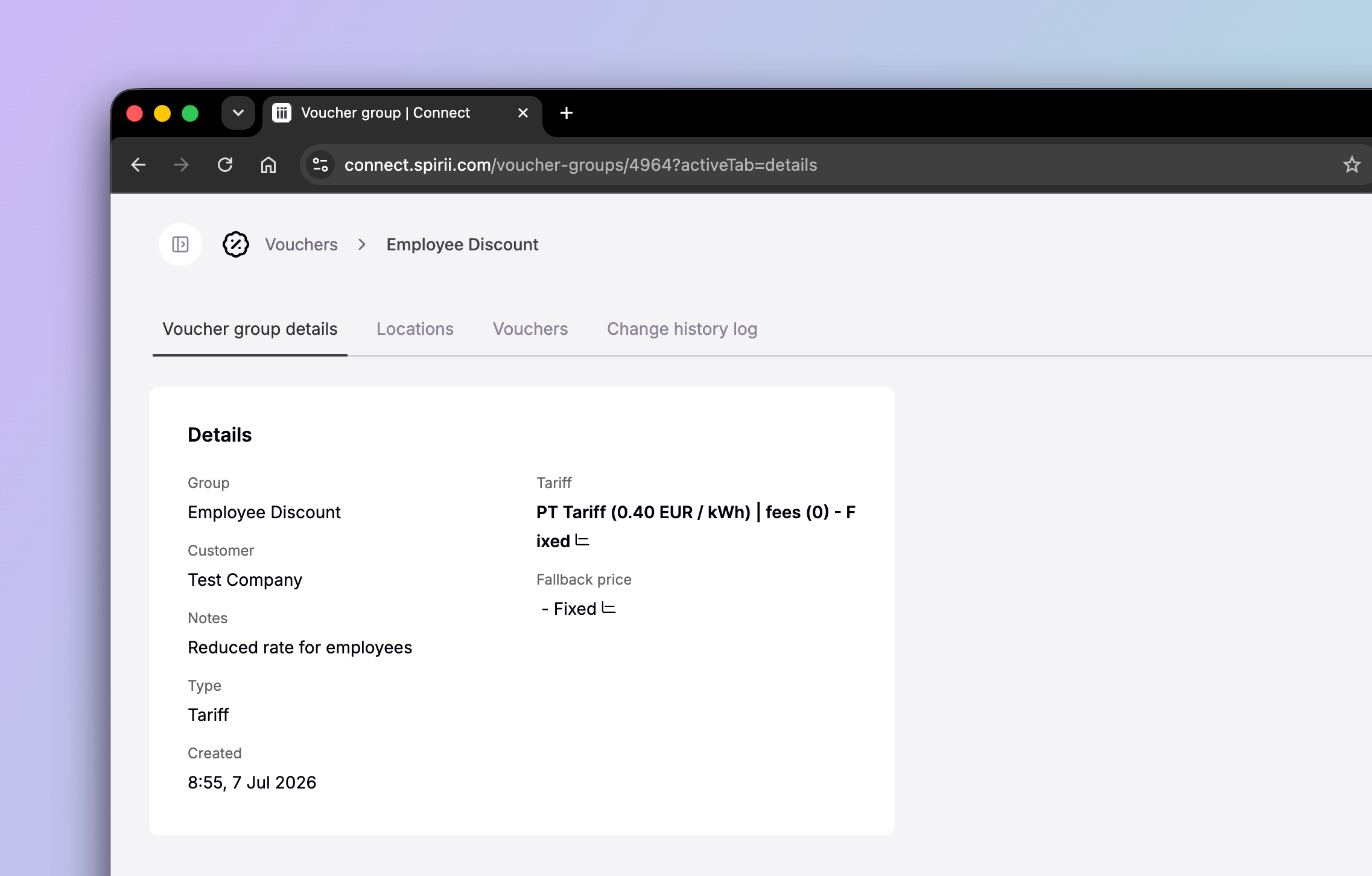
A voucher bundles three things: a group of drivers, the locations they can reach, and the price they pay. You define them once on a **voucher group**, then issue **codes** under it for drivers to redeem. While a code is active, its holder pays the voucher price at the attached locations, and can reach locations that aren't on the public network at all.
It's the tool for any case where a known audience should charge on terms of your choosing: a partner fleet at a negotiated rate, employees or residents at a reduced price, a pilot group with a capped, time-limited code. The common thread is access for a defined group; how you use it is up to you.
## How it works
Setting up voucher access runs in three steps, all under **Vouchers** in Connect:
Give it a name, pick the customer, and set the price: link a tariff (recommended) so pricing stays in one place.
On the group's Locations tab, bind the locations the voucher should grant access to. These are where its price applies.
On the Voucher tab, add a single code or autogenerate a batch with a shared prefix, each with an optional max-users cap and expiry date.
You distribute the codes to your group yourself. Spirii doesn't hand them out. A driver redeems one in **Spirii Go** or a branded app (profile → Vouchers → Add new voucher → enter the code), after which the attached locations appear in their app at the voucher price. A voucher can also be linked to a **Spirii token**, so the token carries the access without the driver entering a code.
For example, an operator opening a depot to a partner fleet creates a group linked to the agreed tariff, attaches the depot, autogenerates a batch of codes with a prefix and an expiry, and sends them to the fleet, without altering the depot's public price.
## Options & configuration
**Pricing.** Set the price with a linked **Tariff**. That's the recommended option, so the voucher controls access while the tariff controls price, and your pricing lives in one place. A **Fixed** price (a flat rate per kWh) or a **Dynamic** price (spot price plus a markup) can also be set directly on the group, but a linked tariff keeps pricing consistent across the platform.
**Code restrictions.** Use **max users** to stop a code being shared beyond the intended group, and **expires at** for time-limited access such as a pilot or a fixed-term agreement. For batches, a clear **prefix** keeps codes easy to recognise and manage.
## When to use it
* A partner or guest fleet you want to admit at a negotiated price, without touching your public tariff.
* Employees or residents who should charge at a reduced rate at your sites.
* A pilot or limited-term group, kept tidy with a capped, expiring code.
## Token association
A voucher can be linked to a token as well as redeemed in an app. The link is made on the individual code rather than the voucher group, and it gives that token the same terms the group defines: the locations the voucher opens, and what charging costs there.
So the same voucher reaches a driver two ways:
* **Through an app user.** The driver enters the code in Spirii Go or a branded app. That attaches their app user to the voucher, up to its max users cap, and applies the access and price to their account.
* **Through a token.** You link the code to a token, and any session started with that token gets the voucher's locations and price.
In Connect, open the voucher group and find the code on its **Vouchers** tab. The code's **Charge Keys** tab is where you select the token to add (tokens appear as charge keys in Connect).
## Dependencies & limitations
* **Spirii's mobility surfaces only.** Vouchers work in Spirii Go, branded apps, and with Spirii tokens. They aren't shared with external eMSPs and don't travel over roaming.
* **A voucher overrides the public tariff.** While active, its holder pays the voucher price — not the public price — at every attached location, so be deliberate about who gets a code and where it applies.
## Related
The voucher group and code objects this builds on.
Link a tariff to set the voucher price in one place.
The sites you attach a voucher to.
Link a voucher to a token to carry its access.
## Overview
A voucher bundles three things: a group of drivers, the locations they can reach, and the price they pay. You define them once on a **voucher group**, then issue **codes** under it for drivers to redeem. While a code is active, its holder pays the voucher price at the attached locations, and can reach locations that aren't on the public network at all.
It's the tool for any case where a known audience should charge on terms of your choosing: a partner fleet at a negotiated rate, employees or residents at a reduced price, a pilot group with a capped, time-limited code. The common thread is access for a defined group; how you use it is up to you.
## How it works
Setting up voucher access runs in three steps, all under **Vouchers** in Connect:
Give it a name, pick the customer, and set the price: link a tariff (recommended) so pricing stays in one place.
On the group's Locations tab, bind the locations the voucher should grant access to. These are where its price applies.
On the Voucher tab, add a single code or autogenerate a batch with a shared prefix, each with an optional max-users cap and expiry date.
You distribute the codes to your group yourself. Spirii doesn't hand them out. A driver redeems one in **Spirii Go** or a branded app (profile → Vouchers → Add new voucher → enter the code), after which the attached locations appear in their app at the voucher price. A voucher can also be linked to a **Spirii token**, so the token carries the access without the driver entering a code.
For example, an operator opening a depot to a partner fleet creates a group linked to the agreed tariff, attaches the depot, autogenerates a batch of codes with a prefix and an expiry, and sends them to the fleet, without altering the depot's public price.
## Options & configuration
**Pricing.** Set the price with a linked **Tariff**. That's the recommended option, so the voucher controls access while the tariff controls price, and your pricing lives in one place. A **Fixed** price (a flat rate per kWh) or a **Dynamic** price (spot price plus a markup) can also be set directly on the group, but a linked tariff keeps pricing consistent across the platform.
**Code restrictions.** Use **max users** to stop a code being shared beyond the intended group, and **expires at** for time-limited access such as a pilot or a fixed-term agreement. For batches, a clear **prefix** keeps codes easy to recognise and manage.
## When to use it
* A partner or guest fleet you want to admit at a negotiated price, without touching your public tariff.
* Employees or residents who should charge at a reduced rate at your sites.
* A pilot or limited-term group, kept tidy with a capped, expiring code.
## Token association
A voucher can be linked to a token as well as redeemed in an app. The link is made on the individual code rather than the voucher group, and it gives that token the same terms the group defines: the locations the voucher opens, and what charging costs there.
So the same voucher reaches a driver two ways:
* **Through an app user.** The driver enters the code in Spirii Go or a branded app. That attaches their app user to the voucher, up to its max users cap, and applies the access and price to their account.
* **Through a token.** You link the code to a token, and any session started with that token gets the voucher's locations and price.
In Connect, open the voucher group and find the code on its **Vouchers** tab. The code's **Charge Keys** tab is where you select the token to add (tokens appear as charge keys in Connect).
## Dependencies & limitations
* **Spirii's mobility surfaces only.** Vouchers work in Spirii Go, branded apps, and with Spirii tokens. They aren't shared with external eMSPs and don't travel over roaming.
* **A voucher overrides the public tariff.** While active, its holder pays the voucher price — not the public price — at every attached location, so be deliberate about who gets a code and where it applies.
## Related
The voucher group and code objects this builds on.
Link a tariff to set the voucher price in one place.
The sites you attach a voucher to.
Link a voucher to a token to carry its access.