> ## Documentation Index
> Fetch the complete documentation index at: https://docs.spirii.com/llms.txt
> Use this file to discover all available pages before exploring further.
# Charge key authentication
> How you issue charge keys to your drivers and control where they can charge.
Charge keys are how your drivers authenticate to charge, and issuing them is how you grant your fleet access: on your own depot and workplace chargers, and out on roaming networks across the ecosystem. This is where you create charge keys, decide how they're billed, and control where they work.
## Overview
A [charge key](/components/access/charge-keys) identifies a driver or vehicle at a charger. When a session starts, the platform recognises the charge key, authorises the charge, and knows how to bill it, with no need for the driver to enter payment details each time.
As a fleet or mobility operator, you issue charge keys to your drivers and they reach two kinds of charger:
The depots, workplaces, and sites you operate.
Other operators' chargers across the ecosystem, when a charge key is enabled for roaming.
The [Charge keys component](/components/access/charge-keys) covers what a charge key is and how billing attaches to it; this page is how you issue and manage them.
In the API, charge keys are called **tokens** and charge key groups are called **token groups** — for example `POST /v2/tokens`. The object is the same; only the name differs.
## Charge key types
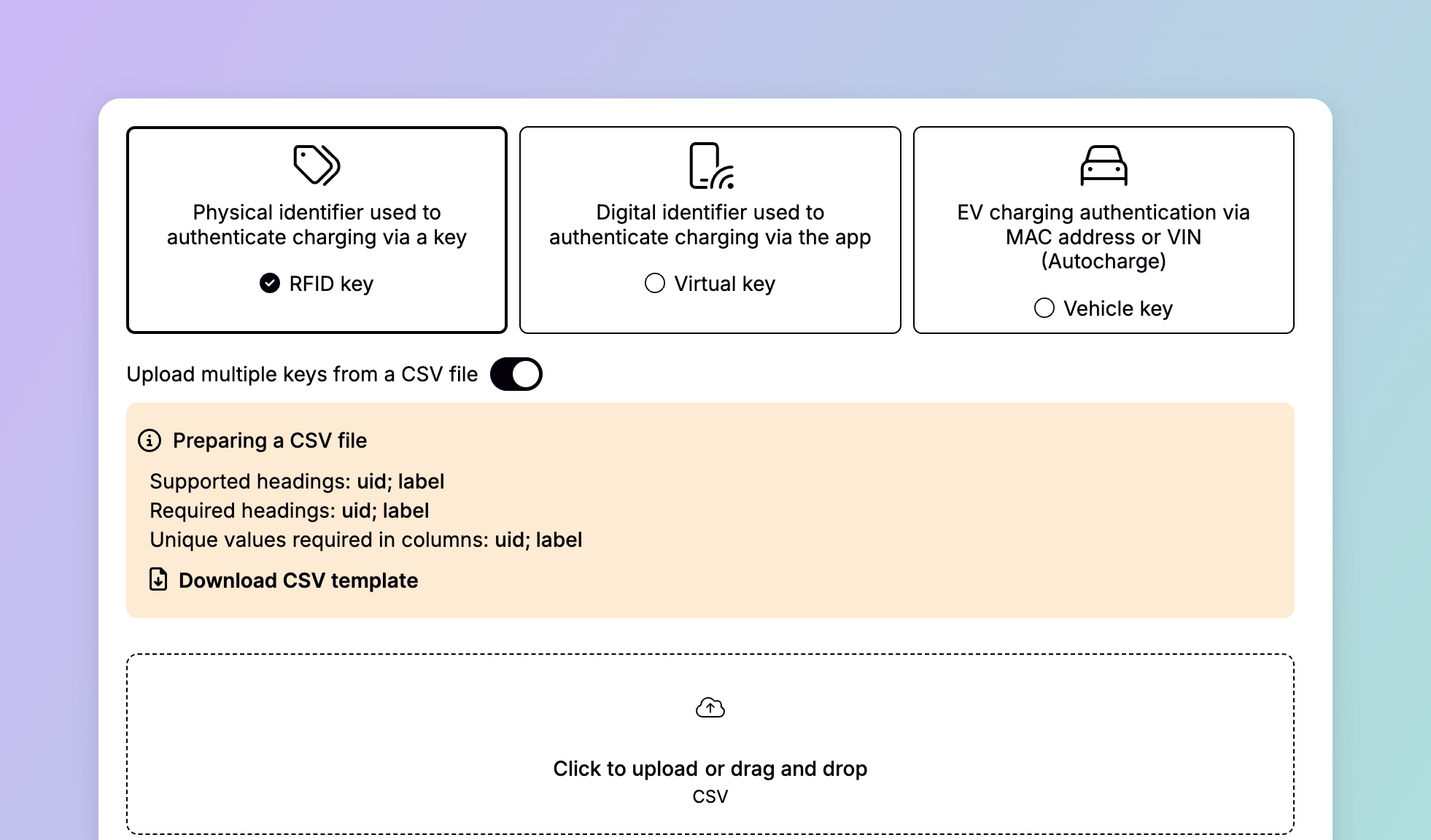
You choose a type when you issue a charge key, and it decides how the driver authenticates.
| Type | How the driver authenticates |
| -------------------- | ---------------------------------------------------------------------- |
| RFID | Taps a physical card or fob at the charger |
| Virtual | Starts the session from Spirii Go or your branded app |
| Vehicle (Autocharge) | Plugs in; the charger recognises the vehicle by its VIN or MAC address |
Some chargers also support **Plug & Charge**, a certificate-based method where the vehicle authenticates itself on plug-in. It's enabled on the charger rather than issued as a charge key type.
Vehicle (Autocharge) works only on Spirii's own network, not over roaming. A driver relying on Autocharge won't be recognised on other operators' chargers.
## Issuing charge keys
You create and manage charge keys in Connect under **Charge Keys**.
Choose the **billing customer**: the account that owns the charge key and is invoiced for its sessions. For a fleet, this is typically the fleet itself, so all charging lands on one invoice.
Pick RFID, Virtual, or Vehicle, then supply the identifier: an RFID chip's UID, a vehicle's VIN or MAC address, or an autogenerated ID for a virtual key.
Give the charge key a label that's unique in Connect. An RFID reference like `DK.SPI.0001234` works, or a fleet vehicle ID like `EVBUS.0007`. Labels are how you recognise a charge key later across reports and groups.
Set the charge key active so it can charge, and enable roaming if your drivers need to charge on other networks. Give it a validity period with a start and an optional end date.
### Bulk uploading
Onboarding a whole fleet at once, you can bulk-upload charge keys from a CSV of UIDs and labels, up to 100 per upload, rather than creating them one by one.
 ## Billing and ownership
Every charge key has a billing customer who's invoiced monthly for all its sessions, the model that lets a fleet consolidate every driver's charging into a single invoice. Alternatively, a driver can link their own payment card to a physical key in the app, so their sessions are billed to them directly.
When you hand a physical key to a driver, they finish the link themselves: they add the key in Spirii Go or your branded app, attach a payment method (or rely on the company billing you've set up), and activate it. From then on they can charge by tapping the key, without opening the app.
## Where a charge key works
### On your own sites
At any of your public locations, an active charge key works straight away. To reserve a depot or workplace for your fleet alone, put its charge keys in a **charge key group** and bind that group to the location: only charge keys in the group can charge there, and they can do so even when the location isn't public. How that interacts with a location's other settings is covered in [Location access](/capabilities/access/location-access).
### On roaming networks
Enable a charge key for roaming and it authorises on other operators' chargers across the networks Spirii connects to; that's the on-the-route half of a fleet's charging. See [Roaming connection](/capabilities/roaming/roaming-connection) for how roaming access is established.
A charge key only works on roaming networks when it's active, enabled for roaming, and labelled in the recommended `DK.SPI.{customerPrefix}` format. An incorrectly labelled charge key is a common reason a driver can't charge on another network. See [Roaming connection](/capabilities/roaming/roaming-connection) for the details.
## Dependencies & limitations
* **A charge key needs a billing customer and activation.** It can't charge until it's active and owned by a billing customer.
* **Labels and IDs are unique.** Each charge key's UID and label must be unique in Connect.
* **Bulk upload is capped.** A CSV upload creates up to 100 charge keys at a time.
* **Requiring a charge key is a charger setting.** Whether a charger demands authentication or lets charging start on plug-in is set on the charge box, not the charge key.
* **Charge key groups override location settings.** A charge key group always grants its members access, ahead of a location's public setting and opening hours. See [Location access](/capabilities/access/location-access).
## Related
What a charge key is, its types, and how billing attaches to it.
How a charge key reaches chargers on other networks.
Attach a voucher to a charge key for access and a set rate at specific locations.
Create and manage charge keys programmatically.
How charge keys, groups, and vouchers decide who can charge at a location.
## Billing and ownership
Every charge key has a billing customer who's invoiced monthly for all its sessions, the model that lets a fleet consolidate every driver's charging into a single invoice. Alternatively, a driver can link their own payment card to a physical key in the app, so their sessions are billed to them directly.
When you hand a physical key to a driver, they finish the link themselves: they add the key in Spirii Go or your branded app, attach a payment method (or rely on the company billing you've set up), and activate it. From then on they can charge by tapping the key, without opening the app.
## Where a charge key works
### On your own sites
At any of your public locations, an active charge key works straight away. To reserve a depot or workplace for your fleet alone, put its charge keys in a **charge key group** and bind that group to the location: only charge keys in the group can charge there, and they can do so even when the location isn't public. How that interacts with a location's other settings is covered in [Location access](/capabilities/access/location-access).
### On roaming networks
Enable a charge key for roaming and it authorises on other operators' chargers across the networks Spirii connects to; that's the on-the-route half of a fleet's charging. See [Roaming connection](/capabilities/roaming/roaming-connection) for how roaming access is established.
A charge key only works on roaming networks when it's active, enabled for roaming, and labelled in the recommended `DK.SPI.{customerPrefix}` format. An incorrectly labelled charge key is a common reason a driver can't charge on another network. See [Roaming connection](/capabilities/roaming/roaming-connection) for the details.
## Dependencies & limitations
* **A charge key needs a billing customer and activation.** It can't charge until it's active and owned by a billing customer.
* **Labels and IDs are unique.** Each charge key's UID and label must be unique in Connect.
* **Bulk upload is capped.** A CSV upload creates up to 100 charge keys at a time.
* **Requiring a charge key is a charger setting.** Whether a charger demands authentication or lets charging start on plug-in is set on the charge box, not the charge key.
* **Charge key groups override location settings.** A charge key group always grants its members access, ahead of a location's public setting and opening hours. See [Location access](/capabilities/access/location-access).
## Related
What a charge key is, its types, and how billing attaches to it.
How a charge key reaches chargers on other networks.
Attach a voucher to a charge key for access and a set rate at specific locations.
Create and manage charge keys programmatically.
How charge keys, groups, and vouchers decide who can charge at a location.